What Happens When You Hit a Spring Boot API: A Step‑by‑Step Request-to‑Response Walkthrough
A Developer’s Walkthrough (and an Interview Favorite)
Press enter or click to view image in full size
You hit an endpoint.
GET /users
You get JSON back.
It feels simple.
But what actually happens inside your Spring Boot application from the moment you press Enter to the moment the response returns?
As backend developers, we use annotations like @RestController, @Service, and @Repository daily. But in interviews — and in debugging real production issues — understanding the internal request flow makes all the difference.
Let’s walk through it properly.
1️ Application Startup: The Foundation
Every Spring Boot app starts with:
@SpringBootApplication
public class MyApplication {
    public static void main(String[] args) {
        SpringApplication.run(MyApplication.class, args);
    }
}
When SpringApplication.run() executes, Spring Boot begins bootstrapping.
Behind the scenes, it:
Creates the ApplicationContext
Scans your project for components
Instantiates beans
Wires dependencies
Applies auto-configuration
This is where Dependency Injection (DI) and **Inversion of Control (IoC)**come into play.
Spring now owns your objects.
You don’t manually create them — the container manages lifecycle, scope, and wiring.
That’s the foundation of everything that follows.
2️ Embedded Server Starts (Tomcat by Default)
Unlike older Spring MVC applications that required external servers, Spring Boot ships with an embedded server.
By default:
Tomcat is started
The app listens on
localhost:8080
Your backend is now ready to receive HTTP requests.
3️ A Request Comes In — Who Handles It?
Let’s say the client sends:
GET /users
The request first reaches a central component:
DispatcherServlet
Spring MVC follows the Front Controller Pattern.
DispatcherServlet is the single entry point for all incoming HTTP requests.
Its responsibilities:
Receive the request
Identify the correct controller
Delegate execution
Manage the response
Think of it as the traffic manager of your application.
4️ Controller Layer — The Entry to Your Business Logic
Example:
@RestController
@RequestMapping("/users")
public class UserController {
  private final UserService userService;
    public UserController(UserService userService) {
        this.userService = userService;
    }
    @GetMapping
    public List<User> getUsers() {
        return userService.getAllUsers();
    }
}
The controller:
Maps the URL
Extracts request parameters
Validates input (if configured)
Delegates work to the Service layer
Returns the response
Important:
Controllers should remain thin.
No heavy business logic here.
This separation becomes very important in scalable systems.
5️ Service Layer — Where Business Logic Lives
@Service
public class UserService {
  private final UserRepository userRepository;
    public UserService(UserRepository userRepository) {
        this.userRepository = userRepository;
    }
    public List<User> getAllUsers() {
        return userRepository.findAll();
    }
}
The Service layer:
Contains business rules
Coordinates multiple repositories
Handles transactions
Applies validations or transformations
In interviews, if someone asks:
“Where should business logic go?”
The correct answer is:
Service layer.
6️ Repository Layer — Database Communication
@Repository
public interface UserRepository extends JpaRepository<User, Long> {
}
The repository:
Talks to the database
Uses JPA / Hibernate / JDBC under the hood
Executes queries
Persists data
If you’re using Spring Data JPA, implementations are generated automatically at runtime.
This abstraction is why we rarely write boilerplate DAO code anymore.
7️ The Response Travels Back
Once data is fetched:
Repository → Service → Controller → DispatcherServlet → Client
If you’re using @RestController, Spring automatically:
Converts objects to JSON
Sets appropriate headers
Returns HTTP status codes
All of this is handled via HttpMessageConverters internally.
You focus on business logic.
Spring handles serialization.
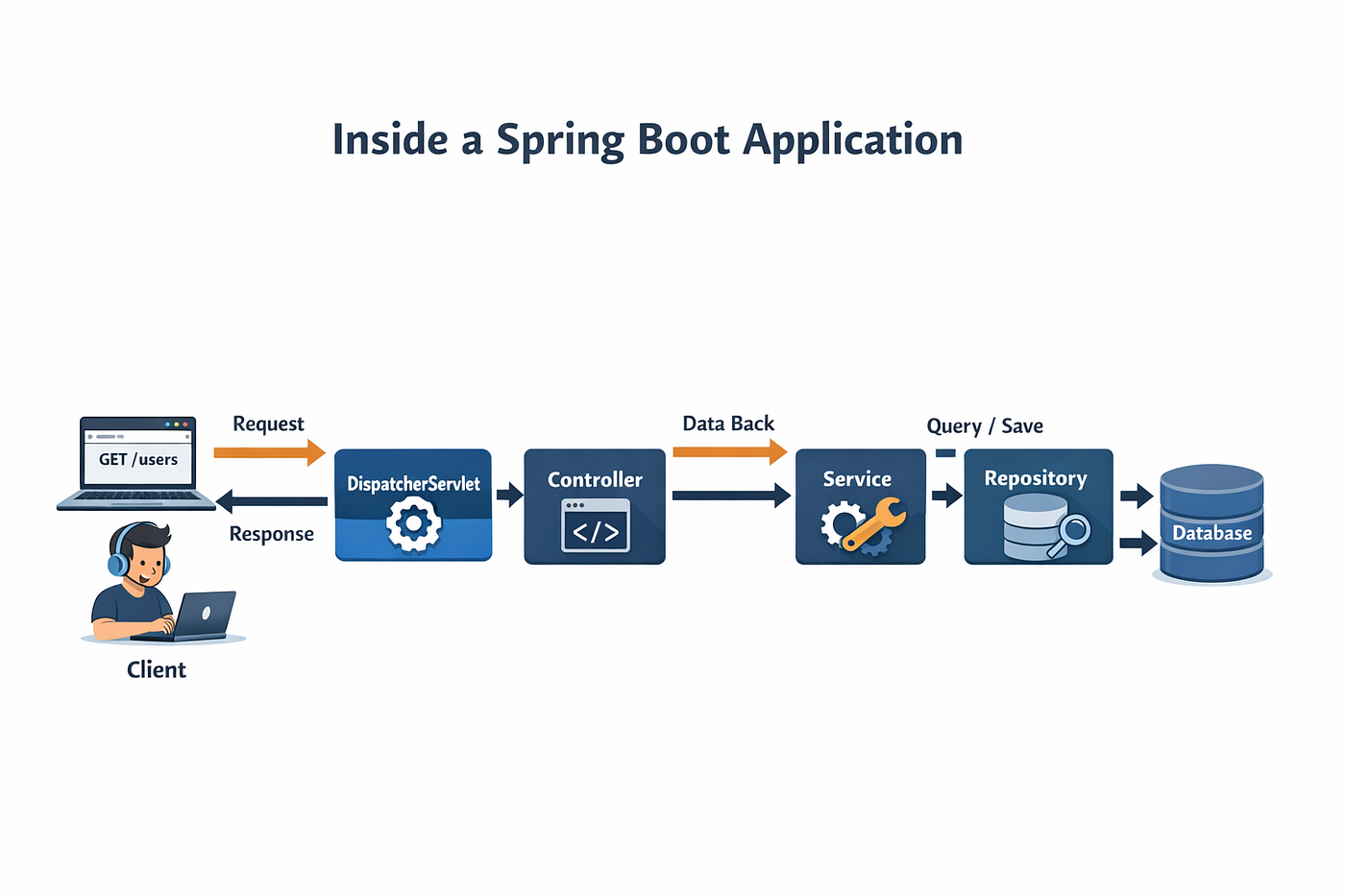
Complete Flow in One Diagram
Client
   ↓
DispatcherServlet
   ↓
Controller
   ↓
Service
   ↓
Repository
   ↓
Database
   ↑
Response flows back the same path
Or simplified:
Client → DispatcherServlet → Controller → Service → Repository → Database
                                    ↑                          ↓
                            Response/Data                Query/Save
What Spring Handles Automatically (And Why It’s Powerful)
During this entire lifecycle, Spring also manages:
Bean lifecycle
Dependency Injection
Exception handling (
@ControllerAdvice)Validation (
@Valid)Security filters (Spring Security)
Transaction management (
@Transactional)AOP (logging, monitoring, auditing)
These are called cross-cutting concerns.
You don’t write repetitive infrastructure code — Spring abstracts it cleanly.
Why This Matters in Interviews
You might get questions like:
What happens when you hit an endpoint?
What is DispatcherServlet?
How does Spring manage beans?
Where does business logic belong?
How does JSON conversion happen?
If you can clearly explain:
“Client → DispatcherServlet → Controller → Service → Repository → Database → Response”
You demonstrate architectural clarity — not just annotation usage.
That’s what differentiates mid-level from senior developers.
My Personal Take
When I first started with Spring Boot, I treated it like magic.
Annotations everywhere.
Everything just worked.
But real understanding came when I debugged request flows, read logs, and stepped through execution.
Once you understand the lifecycle, you:
Debug faster
Design better
Write cleaner layered architecture
Avoid mixing responsibilities
Feel confident in interviews
Spring Boot stops feeling magical — and starts feeling predictable.
And predictability is power in backend engineering.